Nano Banana Pro
A flexible starting point when you need several print, portrait, or landscape shapes, or a 4K option.
Uses more credits than Flux Kontext and Seedream 4.5 at their current settings. Inspect text and preserved details after an edit.
Compare Nano Banana Pro, GPT Image 2, Flux Kontext, and Seedream 4.5 in Spicy Mayo. Choose by the output you need, the credits you want to spend, and how well each result follows your brief.
Start with Nano Banana Pro for the widest choice of image shapes here and a 4K option. Choose Flux Kontext for the lowest current credit cost, Seedream 4.5 for lower-cost 2K exploration, or GPT Image 2 for another take on your brief.
Spicy Mayo brings these models together with image editing, video generation, a shared credit balance, and saved creations. It is an independent studio, not the developer of these models.
Find your creative fitAll four support text-to-image and one reference image for editing in the web studio. Upload JPG, PNG, or WebP up to 4 MB. Prices below are credits per output on current plans, not API dollar prices. Earlier subscribers keep their agreed rates.
| Model / provider | Credits per image | Output settings | Aspect ratios |
|---|---|---|---|
| Nano Banana ProGoogle | 50 · 2K 100 · 4K | 2K or 4K | 1:1 · 16:9 · 9:16 · 4:3 · 3:4 · 3:2 · 2:3 |
| GPT Image 2OpenAI | 63 · Standard | 1024 × 1024, 1024 × 1536, or 1536 × 1024 | 1:1 · 2:3 · 3:2 |
| Flux KontextBlack Forest Labs | 11 · Standard | Standard; dimensions depend on the provider output | 1:1 · 16:9 · 9:16 |
| Seedream 4.5ByteDance | 13 · 2K | 2048 × 2048, 2560 × 1440, or 1440 × 2560 | 1:1 · 16:9 · 9:16 |
Settings describe this website’s implementation. A provider may offer other options in its own product. Higher resolution or a higher price does not by itself prove a better result.
A flexible starting point when you need several print, portrait, or landscape shapes, or a 4K option.
Uses more credits than Flux Kontext and Seedream 4.5 at their current settings. Inspect text and preserved details after an edit.
An alternative image model to try on the same brief, with square, portrait, and landscape formats and high quality selected by the studio.
The studio exposes three shapes and a single Standard size setting; it does not expose a 4K selector for this model.
Testing focused edits or prompt variations with the lowest credit cost among the four image models currently offered here.
Standard resolution only in this studio. A lower credit cost is useful for iteration, but does not establish better image quality.
Exploring 2K concepts on a smaller credit budget, in square, widescreen, or vertical formats.
Three aspect ratios and no 4K selector in this studio. Check fine detail, lettering, and product shape before publishing.
We asked Nano Banana Pro to turn an orange chair cherry red while preserving the scene. The color changed and the broad composition remained recognizable. Reflections and small details were re-rendered.
This example demonstrates one edit. A controlled quality benchmark across all four models has not been run; use the repeatable prompts below to compare results on the work that matters to you.
See the exact prompt and settings
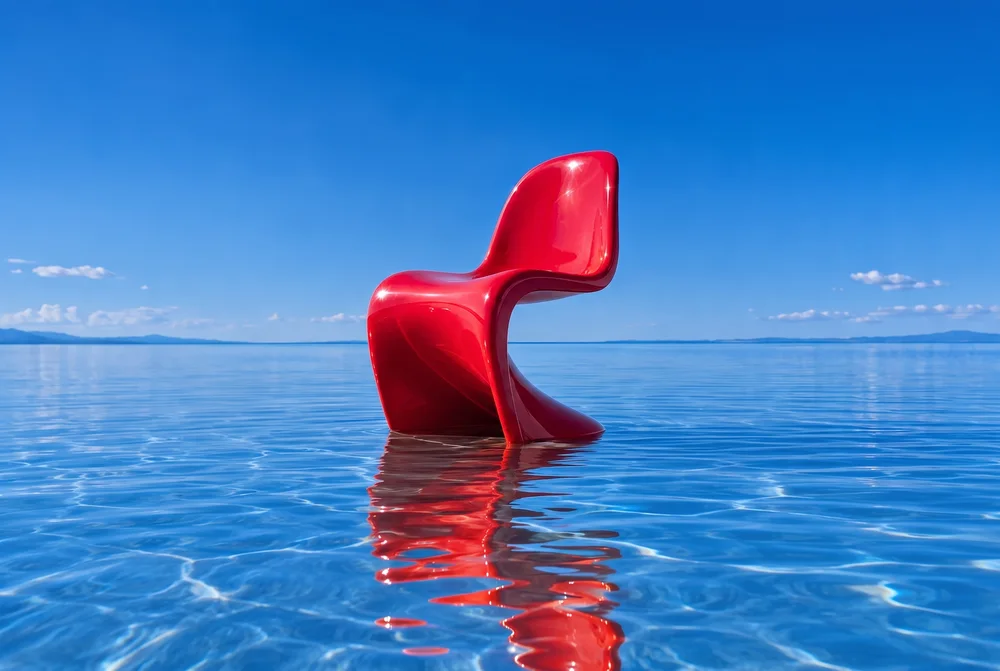
Use the same prompt and reference, keep the aspect ratio consistent, and record the selected model, output size, credit cost, and result. Judge repeated outputs with model names hidden if you want a fairer comparison. These are suggested tests, not published benchmark results.
Change the orange chair to a glossy bright cherry red chair. Preserve the chair shape, the blue water, reflection, background, and composition.
What to check: Compare the silhouette, waterline, reflection, and crop with the original. A successful color change can still alter fine details.
A square editorial poster of an unbranded cobalt glass bottle on an ivory stone pedestal. Warm side lighting, soft shadows, minimal composition. Include only the exact words "A NEW NOTE" at the top, with generous margins.
What to check: Check every letter, the number of bottles, margins, and whether the lighting matches the request.
Replace the background with a warm ivory studio backdrop. Preserve the product silhouette, label text, colors, and camera angle. Add a soft contact shadow consistent with light from the upper left. Do not add props.
What to check: Use the same owned product photo for each model. Compare the label, edges, contact shadow, and any added objects.
Explore a prompt with several image models, then use a supported video model to animate a selected result.
The studio displays the total credit charge for your model and settings. You do not need your own API keys.
Reference uploads, saved creations, reusable prompts, and downloads are available in the same account.
There is no single winner established by this comparison. For the options in this studio, Nano Banana Pro offers the most aspect ratios and a 4K selector, Flux Kontext has the lowest current credit cost, and Seedream 4.5 offers 2K at a lower credit cost than Nano Banana Pro. Compare repeated outputs on your own brief to assess quality.
Spicy Mayo is an independent creative studio with four image models: Google’s Nano Banana Pro, OpenAI’s GPT Image 2, Black Forest Labs’ Flux Kontext, and ByteDance’s Seedream 4.5. Choose a model inside the studio before creating or editing an image.
Yes. The full model catalog lists the nine video models, supported modes, durations, resolution choices, and credit costs. Image and video outputs are different tasks, so their credit costs are not quality rankings.
If the entire allowance is used on one model and setting, it covers 44 Nano Banana Pro images at 2K, 34 GPT Image 2 images at Standard, 200 Flux Kontext images at Standard, 169 Seedream 4.5 images at 2K, or 22 Nano Banana Pro images at 4K. Unspent credits may remain. Mixing settings or creating video changes the total. Read credit expiry and plan details.
Explore the studio, choose a direction, and make it your own.