CREATIVE DIRECTION
Change an outfit in a photo with Spicy Mayo
Try an AI outfit change from one photo. Use a ready-to-edit prompt, choose fabric and color, and review faces, clothing edges and fit before sharing.
Explore the workflowEdit an existing image with a text prompt in Spicy Mayo. Upload your photo, describe the outfit, background, color, or lighting you want to change, and choose what should stay. Start with Nano Banana Pro, or choose Nano Banana 2.1 to combine up to four reference photos in one edit.
Opens a suggested prompt. Review it before generating.
Nano Banana Pro · 2K: 50 credits · 4K: 100 credits · Subscription required
Make a new version of one reference image without starting from a blank canvas. Clear instructions help preserve the parts you want to keep.
We asked Nano Banana Pro to turn the orange chair cherry red while preserving the scene. The chair color changed; reflections and fine details were re-rendered. This is one studio result, shown with its original reference.

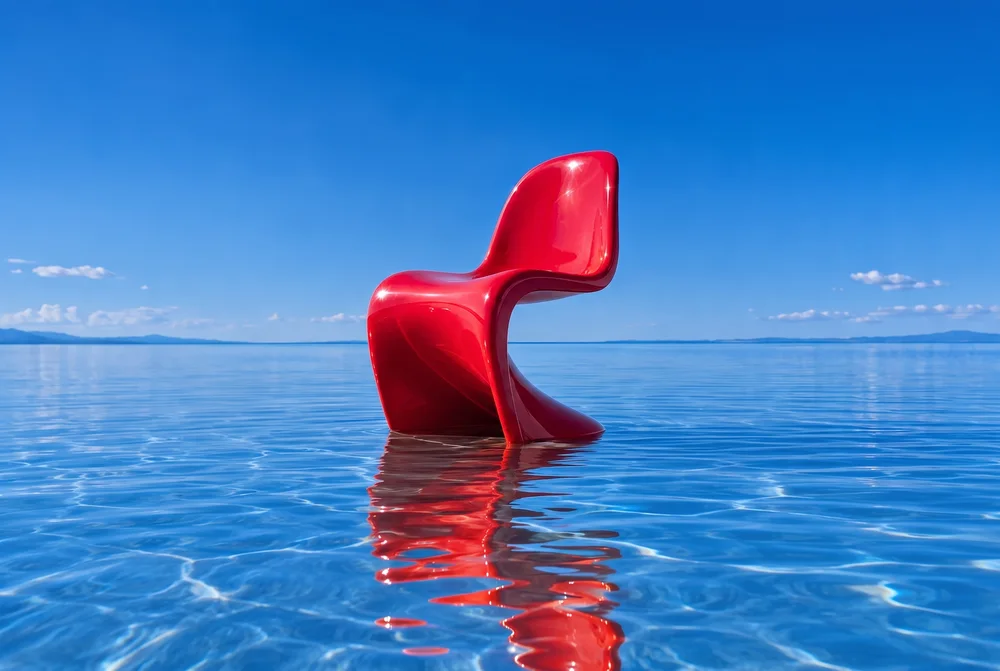
Exact prompt: “Change the orange chair to a glossy bright cherry red chair. Preserve the chair shape, the blue water, reflection, background, and composition.”
Read the full editing walkthroughTry an AI outfit change from one photo. Use a ready-to-edit prompt, choose fabric and color, and review faces, clothing edges and fit before sharing.
Explore the workflowUse Spicy Mayo to explore gentle AI restoration of a scanned photo. Reduce dust and faded contrast while checking reconstructed faces and period details.
Explore the workflowTry AI room restyling in Spicy Mayo. Use a warm walnut and linen prompt, preserve the room layout, and review scale, windows and perspective.
Explore the workflowChoose one JPG, PNG, or WebP up to 4 MB (up to four with Nano Banana 2.1). A clear image with a visible subject gives you a useful starting point.
Ask for one specific change, then name the details to preserve: shape, position, material, background, or lighting.
Pick an aspect ratio close to the original and generate a 2K or 4K result. Inspect the subject and fine details before downloading.
These are starting instructions, not guaranteed results. Change the subject or setting to fit your idea.
Change the main subject to a rich cherry red. Preserve its shape, texture, position, and the surrounding scene. Keep the lighting and perspective consistent.
Use this promptRelight this photograph with soft golden-hour light from the left. Preserve the subject, clothing, framing, and background. Use natural warm highlights and realistic shadows.
Use this promptGive this photograph a subtle editorial film look with warm colors and fine grain. Preserve the subject, composition, and recognizable details. Avoid excessive smoothing.
Use this promptReplace the jacket with a navy linen blazer. Keep the person's face, hairstyle, pose, trousers, and background as close to the original as possible. Match the existing light and fabric folds.
Before you publish: Inspect the face, hands, clothing edges, and body shape. This is a creative wardrobe visualization, not a prediction of garment fit or an exact virtual fitting room.
For a portrait, ask for softer window light while preserving expression and framing. For a room, change just one wall color or upholstery material while preserving furniture positions and perspective.
Before you publish: Change one feature per attempt so you can compare results. Use a photo you have permission to edit, and check details that the model was asked to preserve.
Changing a single color is easier to assess than changing the outfit, setting, camera angle, and lighting at once.
A very different aspect ratio asks the model to reinterpret the composition. Start with the closest available ratio when framing matters.
AI can change faces, lettering, textures, and proportions even when asked to preserve them. Compare the result with your original.
Arrived from a “Nano Banana 2.5” or “spicy mayo” search? Read the spicy-mayo model tracker
Open Edit image, upload one JPG, PNG, or WebP up to 4 MB, and describe your change. Name the subject details you want to preserve, choose your model and settings, then generate. Compare the result with the original before downloading the PNG.
An image edit starts with your uploaded photo and a text instruction. Text-to-image generation starts with your description alone. Spicy Mayo supports both in the same studio; use Edit image when an existing photo should guide the result.
Yes. Describe the new clothing or setting and ask to preserve the face, pose, and framing. For example: replace the jacket with a navy linen blazer, keep the person's face and pose, and match the existing light. Check clothing edges and likeness; an outfit edit is a creative visualization, not a guarantee of garment fit.
You can request text in the prompt. Put the exact wording in quotation marks, keep it short, and specify where it should appear. Check every letter in the output. For a final logo, legal label, or precise poster layout, add approved typography in a design tool after generating the artwork.
Reuse a clear reference and describe the features, clothing, and proportions that should stay. Keep the framing similar and change one element at a time. A reference helps guide continuity, but faces and small details can still change between outputs.
Yes, with Nano Banana 2.1: upload up to four reference photos (4 MB each) and say which photo supplies which element, for example "the person from photo 1 wearing the jacket from photo 2". Other image models accept one reference per edit.
There is no released model called Nano Banana 2.5; it is the community name for the Arena test model "spicy-mayo", which trackers report shipped as Nano Banana 2.1 on 6 October 2026 (Google has not confirmed). This page opens an editing workflow with Nano Banana Pro; switch to Nano Banana 2.1 in the studio for multi-photo edits at 30–60 credits. Examples on this page identify the model that produced them. Our spicy-mayo tracker has the dated sources.
Nano Banana 2.1 offers 1K, 2K and 4K output, eight aspect ratios and up to four references at 30–60 credits. Nano Banana Pro offers 2K and 4K at 50–100 credits. Flux Kontext, Seedream 4.5, and GPT Image 2 provide other editing options with different costs and settings. Choose for the output you need and compare results on your own photo; there is no single model that is best for every edit.
No. "spicy-mayo" is the Arena codename of an anonymous image model seen in blind battles from 9 September 2026 and widely believed to be Google's; Spicy Mayo (this site) is an independent studio named after the codename. The model picker identifies the released model used for each request — Nano Banana Pro by default on this page, or Nano Banana 2.1 — and our studio name does not imply access to an unreleased model or any affiliation with Google.
Start with the three prompts on this page, browse the outfit and product-photo examples, or open the before-and-after guide for an exact prompt used in the studio. Each example provides a starting point you can adapt to your own photo.
Yes. Open Spicy Mayo in a modern mobile browser, sign in, and choose Edit image. Upload a supported photo, review the generation settings, and download the result. You can also use the same web account on a tablet or computer.
For the same model and settings, creation and editing use the same number of credits. Nano Banana Pro uses 50 credits at 2K or 100 at 4K; Nano Banana 2.1 uses 30, 45 or 60 credits at 1K, 2K or 4K. Other image models have their own rates. Generating requires an active subscription and enough credits; check the studio quote before generating.
No. The model creates a new image from your instructions and reference. Faces, lettering, textures, reflections, and proportions can change. Keep the original and compare details carefully; this is not a pixel-exact selection or layer editor.